Did you know we do custom work?

IMG_1230

White ink on kraft, big fun for vintage-y wedding.

Sometimes we forget to mention our custom stationery work, which has been our sweet spot for over a decade. We just assume people know that we produce lots of stuff that is not on the StationeryHQ website, but our customer service ninjas tell us that we are mistaken.

When you have a job that doesn’t fit the portal we can provide a quote, all we need are some specifications and it helps if we have a file to look at.

To check out a few of our custom services please look at this page Custom Jobs

To upload a file just click on this link:   Custom Job Upload

Tell us what you want, what you really really want and we will try figure out how to do it and get you the costs to make sure it works for your client.


You asked and we delivered – Envelopes from Waste Not Paper® on StationeryHQ.com

Waste Not Envelopes

Waste Not Envelopes

You asked and we delivered – Envelopes from Waste Not Paper® on StationeryHQ.com Waste Not has had a great reputation for many years in the fine stationery marketplace. We knew our designers wanted us to provide a low quantity option for Waste Not envelopes in sassy colors. Cuz you yelled it from the rooftops. Really loud.

So Scott started working on a partnership with Waste Not so that our customers could do one-stop shopping for their stationery needs. We are very excited to be able to provide that experience. Many of you probably want these with liners, with printing, and with Waste Not’s entire color lineup (which is amazing). We are starting with three sizes and six colors and if they sell like hotcakes we’ll add more colors and more options to make your envelopes as fabulous as your card design. We have A7, A2 and 4Bar Euro Flap envelopes in these colors:
Pure White
Pool
Peacock
Coral
Slate
Luxe Blush
The Luxe Blush is on order, should be available in late in May or early June. I sure hope you like these and that they help your business grow and be more profitable.

Who wants to create variable data envelopes with cool fonts through illustrator?

Designers have their favorite tools. Some of us old people remember the Pagemaker versus Quark wars which was like debating about Democrats and Republicans. No one is changing their mind.

The one platform that rarely is debated is the illustration tool. Adobe Illustrator won without any serious competitors. It is an amazing tool for design and we love it from a production standpoint. Vector art produces the best output but when it comes to variable data we recommend InDesign.

If you’re an Illustrator purist, there are options for you. Click the link below to learn how to set up variable data in Illustrator, it’s definitely for the advanced user.

Have fun reading (yeah, it’s a bit dry) and hurry up and create some awesome looking variable data envelopes we can produce for you and make your customers smile.

Variable Data Envelope Printing (I know, it’s about time)…

Variable Data Envelope Printing

We’ve had lots of requests for this service and we are finally able to make it happen through online ordering on StationeryHQ.com.

We are releasing this in A2 and A7 sizes initially. If we don’t have issues we will release A6 soon and will bring variable data to other products also.

To order envelope addressee printing, simply set up your addresses as follows:

1.    Create a multi-page, black or color, 7.25″ x 5.25″ document with each name and address on a single page for the A7 envelope. For A2 file size should be 5.75 x 4.375.

2. Save the file as a high resolution, multi page pdf file.

3. Upload the file.

4. Proof your artwork (you can view as many pages as you’d like).

5. Complete your order.

Go nuts with your typography. Once your file is ready, click here to get started.

Order Now

White Ink – how the heck should files be prepared?

You can do some beautiful things with white ink. Whether it’s on kraft or one of our other stocks the effects can be stunning. We already produce quite a few offline orders with white ink and in 2014 we will offer kraft with white ink online…..just don’t ask me for a date yet. Laura Mitzelfelt from www.lmitzdesign.com shared this PDF so you can see how she prepares files for white ink (Thanks Laura). PDF_with_White_Ink_Channel

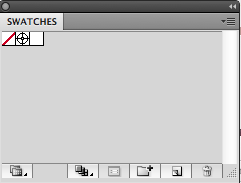
1. First, you will need to set up your white ink swatch. At the menu at the top, go to Window > Swatches.

White_Ink_StationeryHQ_1
It should bring up this menu: Click on the button to the left of the trash can to create a new swatch. You will want to name the swatch White_Ink (case sensitive), set the color type to Spot Color, and plug in whatever CMYK values you want so you can distinguish your white ink printing from the rest of your design.

The options should look similar to this:

 White_Ink_StationeryHQ_2-300x210

Now, you have set up a spot color for white ink!

2. You can apply this color swatch to any object by selecting the object, and then clicking on the White_Ink color box that was created in your swatch window.

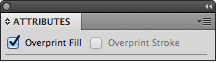
3. If you would like a white ink layer underneath a design (such as light pink text that won’t show well on Kraft stock), then we need to make sure the white ink layer does not knock out the design. To do this, you will need to duplicate the designs that need white ink underneath them and change the color to White_Ink. Make sure that the white ink layers are on top of the actual designs. Then, go to Window > Attributes to bring up another window. Select all of the white ink portions that need to be underneath a design, and then check the box that says “Overprint Fill”. This will ensure that the white ink layer is separate from what is underneath it, and will not knock the design out when the print ready PDF is created.

White_Ink_StationeryHQ_3

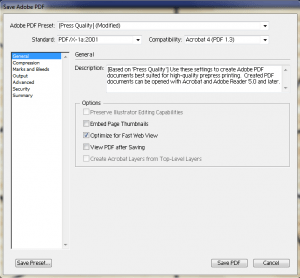
4. Once your design is completed, you can save your PDF by going to File > Save and selecting Adobe PDF as the file format. The best settings to use are below:

White_Ink_StationeryHQ_4-300x278

Should you be using Illustrator, InDesign, or Photoshop?

We are frequently asked by designers, “Should I be using IllustratorInDesign, or Photoshop?”

Normally, we would urge them to use the tool that they are best and most familiar with. After all, you can do the similar things in all of the programs and achieve very similar results. However, there are some key differences between the three that can affect how your artwork will print.

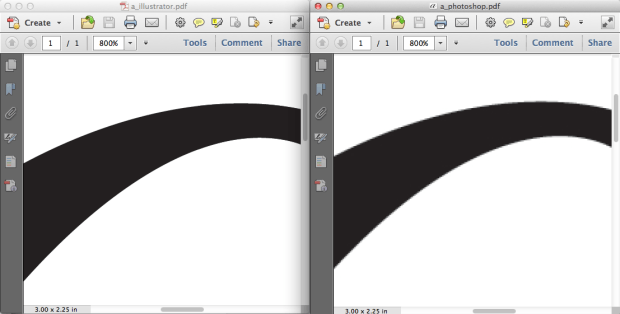
While Photoshop is an amazing tool for image and color editing, it can present printing challenges when it comes to wedding invitations, birth announcements, and other fine stationery. The reason for this is because it is a pixel based program. From a distance, you may not notice this. But if you zoom in, you will see that your letters and designs are built pixel by pixel. For the finer details, it can be very noticeable.

Illustrator and InDesign, on the other hand, work with shapes, called vectors. Vectors are based on mathematical curves (oh boy…), and because of this, it doesn’t matter how big or small they are. The shape will always remain crisp.
Screen Shot 2014-03-17 at 5.21.52 PM

Comparison of an Illustrator PDF vs a Photoshop PDF

We (and our competitors) produce through digital printing, which is not as high resolution as conventional offset printing. Most of the time, you wouldn’t be able to tell the difference; however, digital printing tends to have more trouble with small or thin text. Our digital presses print with dots instead of actual lines, and when the text gets too thin, the dots just can’t do a good job of replicating what it looks like on screen. Because of this, it is even more important to make sure your files are created in the best quality possible.

If you were to create and save a design in Illustrator, then save the same design in Photoshop, and then print them both on the same sheet, they would actually appear different. Illustrator outputs vectors and then the press changes it to dots. Photoshop creates dots (pixels) and then the press creates different dots. It is more reliable to count on the vectors to be converted into dots than pixels. Hopefully this makes sense.

Of course, for many designs this might not be a big deal, but when it comes to time crunched wedding invitations for a bridezilla, do you want to take any risks?

Long term, we really recommend adding Illustrator or InDesign to your toolbox for an optimal printing experience. We believe that this will help to make your customers happier.

Jaimie

Why won’t we refund or reprint orders lost or delayed by the USPS on StationeryHQ.com?

We love the USPS, wait we hate them. Sometimes it depends on the day.

We love them because:

  1. They offer great freight rates
  2. They ship coast to coast faster than ground
  3. They supply great boxes which protect products
  4. They have that whole “neither snow nor rain nor heat nor gloom of night….” motto

We want to boycott them because:

  1. They won’t reimburse us when they mess up. (UPS and Fedex do). Well actually they will  occasionally  when they screwed up two orders valued over $500 this holiday and they reimbursed us around $60.
  2. Their shipment times are suggestions. The other carriers guarantee theirs.
  3. Sometimes their tracking doesn’t update for over a week

They drive us crazy. We want to offer their service and whenever we have a problem it is usually bad and we consider shutting off their service from StationeryHQ.com. We’re kind of stuck here because their rates are competitive but their reliability is shaky.

So here’s the deal, we cannot refund or reprint any orders lost by the USPS.

In our experience the USPS has an unreliable track record for delivering orders on time. When this happens they do not allow us to file a claim until at least 15 days after the order has shipped. Once a claim has been filed, the USPS initiates a search for your order. If you order is found it is shipped back to us and the claim is considered fulfilled (can you believe that?). This doesn’t help you, your client, or us does it?

If they can’t find it we MAY receive a claim (another can you believe that?)

We do want you to keep using USPS however please don’t use them on any order that is expensive or critical.

More information can be found about the USPS claims process here:

Domestic Claims

International Claims

Online ordering of foil stamped cards is live on StationeryHQ.com

foil-300x200

Online ordering of foil stamped cards is live on StationeryHQ.com.

Well sort of….We launched a single sided A7 digitally printed card with foil stamping on one side today (3/14/2014). Don’t worry, we have lots of other products coming to go with this however we wanted to launch with an MVP (minimum viable product).

We have been doing quite a bit of foil stamping over the last two years. It’s a lot of work to launch new product and this one proved especially difficult since the dies are made offline.

We know this will reduce the cost to produce foil stamped cards but we weren’t sure what kind of challenges you would face when ordering your cards.

Here are the things we have discussed and have not solved yet:

1.  What do we do when you want to reorder and you have already paid for the die? (not sure how we are going to do this yet)

  • 2. How can we produce these under our current 72 business hour promised turn time? We don’t make dies in-house at this time so we cannot ship within 72 hours. For now we are committing to seven working days. Hopefully we can reduce this time in the future.

3. How can we produce a proof before running the entire job? (this is not an option for online orders at this point)

4. How do I order other sizes online if I need more than a 5 x 7?

We decided to launch with only one product in case we have issues. If this works well we will add A2 and 4bar within two weeks.

I hope you like our offering and will help us be successful at this.  Feel free to contact your rep with any questions or comments and thanks for giving us a chance to try new things!

What the Heck is PUR Binding on StationeryHQ.com??

What the Heck is PUR Binding??

The process we use for binding journals and wedding guest books on stationeryHQ.com is called PUR binding.

Here is a video where  you can meet Eric of StationeryHQ.com and see our PUR binding. It’s fascinating…. okay, not really. For most people it’s enough to know that it is cold melt process (versus hot melt on those paperback books that fall apart) which yields a stronger book.

Eric Nielsen is one of our awesome representatives, he’s been with the company for a long time and in the printing business for even longer. Meet Eric

For those of you who like to dig into production details here are a few articles on PUR binding.

American Printer Magazine Article

Another good article

If you need more information please email info@stationeryHQ.com or tracy@stationeryhq.com, or post a message on twitter or our Facebook page. Or go old school and give us a call at 800-384-0910.

Considering a Deal Site Offer?

Considering a Deal Site Offer?

Several of our customers have asked us to do the back-end order fulfillment for Zulily,Living SocialGrouponJane, and other deal sites.  They want to expose their brand to thousands of customers and a deal site is a quick way to accomplish that. The challenge is very skinny margins and lots of labor to process the orders.

Not anymore. I bet you didn’t know that StationeryHQ has an automated process for fulfilling a deal site offer. You don’t have to input hundreds of individual orders on StationeryHQ.com to fulfill a deal. SHQ has come up with an easy 1-2-3 process for fulfilling deal site orders. Go ahead, offer of any your products that we manufacture and we’ll get the entire deal fulfilled in 10 days from receipt of files.

Contact your sales representative or tracy@stationeryhq.com for the details.

Please note: We can only accept a limited number of deal site offers per month. All deal site fulfillment projects must be scheduled in advance.