What’s New

Who wants to create variable data envelopes with cool fonts through illustrator?

Designers have their favorite tools. Some of us old people remember the Pagemaker versus Quark wars which was like debating about Democrats and Republicans. No one is changing their mind.

The one platform that rarely is debated is the illustration tool. Adobe Illustrator won without any serious competitors. It is an amazing tool for design and we love it from a production standpoint. Vector art produces the best output but when it comes to variable data we recommend InDesign.

If you’re an Illustrator purist, there are options for you. Click the link below to learn how to set up variable data in Illustrator, it’s definitely for the advanced user.

Have fun reading (yeah, it’s a bit dry) and hurry up and create some awesome looking variable data envelopes we can produce for you and make your customers smile.

Variable Data Envelope Printing (I know, it’s about time)…

Variable Data Envelope Printing

We’ve had lots of requests for this service and we are finally able to make it happen through online ordering on StationeryHQ.com.

We are releasing this in A2 and A7 sizes initially. If we don’t have issues we will release A6 soon and will bring variable data to other products also.

To order envelope addressee printing, simply set up your addresses as follows:

1.    Create a multi-page, black or color, 7.25″ x 5.25″ document with each name and address on a single page for the A7 envelope. For A2 file size should be 5.75 x 4.375.

2. Save the file as a high resolution, multi page pdf file.

3. Upload the file.

4. Proof your artwork (you can view as many pages as you’d like).

5. Complete your order.

Go nuts with your typography. Once your file is ready, click here to get started.

Order Now

White Ink – how the heck should files be prepared?

You can do some beautiful things with white ink. Whether it’s on kraft or one of our other stocks the effects can be stunning. We already produce quite a few offline orders with white ink and in 2014 we will offer kraft with white ink online…..just don’t ask me for a date yet. Laura Mitzelfelt from www.lmitzdesign.com shared this PDF so you can see how she prepares files for white ink (Thanks Laura). PDF_with_White_Ink_Channel

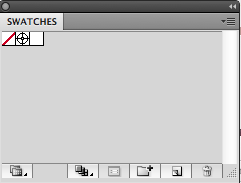
1. First, you will need to set up your white ink swatch. At the menu at the top, go to Window > Swatches.

White_Ink_StationeryHQ_1
It should bring up this menu: Click on the button to the left of the trash can to create a new swatch. You will want to name the swatch White_Ink (case sensitive), set the color type to Spot Color, and plug in whatever CMYK values you want so you can distinguish your white ink printing from the rest of your design.

The options should look similar to this:

 White_Ink_StationeryHQ_2-300x210

Now, you have set up a spot color for white ink!

2. You can apply this color swatch to any object by selecting the object, and then clicking on the White_Ink color box that was created in your swatch window.

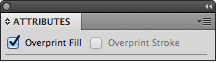
3. If you would like a white ink layer underneath a design (such as light pink text that won’t show well on Kraft stock), then we need to make sure the white ink layer does not knock out the design. To do this, you will need to duplicate the designs that need white ink underneath them and change the color to White_Ink. Make sure that the white ink layers are on top of the actual designs. Then, go to Window > Attributes to bring up another window. Select all of the white ink portions that need to be underneath a design, and then check the box that says “Overprint Fill”. This will ensure that the white ink layer is separate from what is underneath it, and will not knock the design out when the print ready PDF is created.

White_Ink_StationeryHQ_3

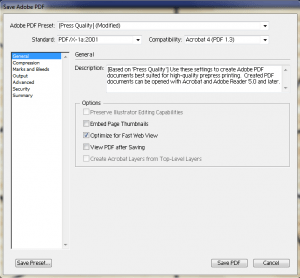
4. Once your design is completed, you can save your PDF by going to File > Save and selecting Adobe PDF as the file format. The best settings to use are below:

White_Ink_StationeryHQ_4-300x278

You Asked. We Delivered. NSS 2013 Survey Round-up!

2013 marks our fifth year in attending the National Stationery Show (NSS); however, we haven’t always been known as “StationeryHQ”. In the first few years, we appeared as our corporate brand, PrintHQ, and our retail brand, Frecklebox. Nevertheless, we have always been StationeryHQ behind the scenes, and since then, we’ve been steadily growing with your continued loyalty and support.

We’ve learned a lot through these past couple of years, and we’d like to share some of that knowledge with you. At this year’s NSS, we had the pleasure of meeting and greeting many of our customers, and we gathered some of their thoughts and opinions on paper.

Here’s the Survey Round-up for NSS 2013:

1. Did you know about StationeryHQ.com before wandering aimlessly into our booth?

  • 34% : Nope! Not a clue.
  • 66% : Absolutely! How could I not?

2. What prevents you from doing more business?

  • 21% : My site does not have personalization technology.
  • 12% : My site does not accept orders.
  • 17% : I have tons of business so don’t get all up in my face about it. (Sorry!)
  • 50% : Other

3. What’s your biggest manufacturing challenge? Although some don’t manufacture, here are our visitors’ top five biggest manufacturing challenges:

  • Time/ Shipping times
  • Printing and quality
  • Price
  • Custom services (on metallics, letterpress, foil, lamination, envelope conversion)
  • Finding partners/vendors

4. Have you ever tried personalized direct mail to get new business?

  • 18% : Yes
  • 71% : No
  • 11% : WTF?

5. Do you totally wish we offered a printed proof for under $10?

  • 66% : Totally.
  • 22% : Not even a little bit.
  • 12% : It’s complicated.

6. What do you wish we offered on StationeryHQ.com? Here’s a snapshot of their wishes:

  • More paper stock options, such as colored and wood
  • More double thick sizes, such as coasters
  • Banners
  • Edging
  • Larger magnetic postcards
  • Tote/gift bags
  • Home Decor
  • Plates
  • Laser cut
  • Custom tissue

…and that’s it for the 2013 NSS Survey Round-up. We’re working through the survey list to see which products/services we can add this year.

Do you agree/disagree with what our booth visitors said? Share your “two-cents” in the comments section below!

We hope to see you all again next year!